Email Automation That Gets Replies: 5 Workflows to Set Up Now

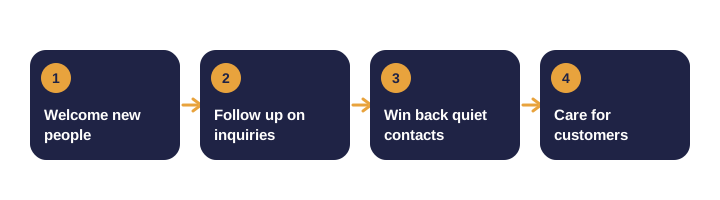
Email remains one of the highest-return channels for most businesses. Automation makes it manageable.
Instead of one-off campaigns, you set up sequences that run when someone takes a specific action. These five workflows are the best place to start.
Why start with workflows instead of campaigns?
| Campaign | Workflow |
|---|---|
| Reaches everyone at one moment | Reaches each person when it matters to them |
| Often ignored by people not ready | Matches the message to the moment |
| Needs someone to press send | Runs on its own |
1. Welcome sequence
Trigger: someone subscribes. Goal: build trust and set expectations.
| Day | |
|---|---|
| 0 | Thank them, explain what they will receive, deliver the resource |
| 2 | Share one practical tip. Do not sell yet. |
| 4 | Tell a short customer story and ask for their biggest challenge |
| 7 | Offer one next step, such as a consultation or free audit |
2. Lead follow-up
Trigger: a form, quote request or booked call. Goal: start a real conversation quickly.
- Immediately: acknowledge the request and say what happens next.
- Within one business day: answer the most likely question for that inquiry, such as pricing range or timeline.
- After three or four days: send a short check-in that offers an easy yes or no.
3. Re-engagement
Trigger: no opens or clicks for about 90 days. Goal: reconnect or clean your list.
- Message 1: ask whether they still want to hear from you, with a clear choice to stay subscribed.
- Message 2: share your most valuable recent content.
- No response: remove them from regular sends.
A smaller, engaged list improves deliverability and gives you better data.
4. Post-purchase care
Trigger: a purchase, booking or finished project. Goal: help the customer succeed.
- Week one: practical onboarding tips and how to get support.
- After a suitable interval: a related product or service that complements the purchase.
5. Review and feedback request
Trigger: results delivered or service finished. Goal: collect honest feedback and public reviews.
- Send the request one or two days after completion.
- Make the review link easy to find, and keep the message short.
- If the customer reports a problem, route it to a person first.
How do you write emails that get replies?
- Subject line: state the value plainly.
- Opening: start with the reader's situation, not your history.
- Call to action: one main action per email.
- Voice: write as one person to another, and sign with a real name.
- Unsubscribe: keep it easy to find.
How do you keep emails out of spam?
- Send only to people who opted in.
- Remove bounced addresses and avoid purchased lists.
- Set up SPF, DKIM and DMARC for your sending domain, as your provider recommends.
- Keep subject lines honest, and watch complaint rates.
What should you measure?
| Workflow | Key metric | Healthy signal |
|---|---|---|
| Welcome | Click rate on the first resource | Steady clicks across the sequence |
| Lead follow-up | Reply rate and response time | Replies within one business day |
| Re-engagement | Share who re-engage | Clear split between engaged and removed |
| Post-purchase | Support questions and repeat orders | Fewer questions, more repeat business |
| Reviews | Review volume and rating | Steady new honest reviews |
How do you get started?
- Choose the workflow that affects revenue or staff time most.
- Write the emails in a document and read them aloud.
- Build the sequence and test every branch with your own address.
- Launch, measure for four weeks, and make one improvement.
- Add the next workflow once the first runs reliably.
Subject line formulas
- Specific value: "Your free checklist for a faster site launch"
- Question: "Are your leads waiting more than a day for a reply?"
- Next step: "Two minutes to review your welcome sequence"
- Personal note: "Following up on your question about pricing"
A sample welcome email outline
- Greeting with the subscriber's first name.
- One sentence confirming what they signed up for.
- The resource link, with a short description.
- One practical tip they can use today.
- A single question inviting a reply.
- Your name, role and a working reply address.
Email terms you will hear
| Term | Meaning |
|---|---|
| Double opt-in | New subscribers confirm their address before receiving emails |
| Bounce | An email that could not be delivered |
| Open rate | A rough signal of interest, though privacy features make it less reliable |
| Deliverability | The likelihood an email reaches the inbox rather than spam |
Scenario: a dance studio with seasonal enrollment
- A workflow sends a welcome sequence to every trial class attendee.
- A re-engagement sequence targets families who have not booked in ninety days.
- A review request goes out after the end-of-term showcase.
- Each sequence has a clear exit when someone enrolls or unsubscribes.
Myths and facts
| Myth | Fact |
|---|---|
| Buying a list grows your business | Unengaged contacts hurt deliverability and cost money |
| Frequent emails keep people loyal | Relevant emails at the right time keep people loyal |
| Open rates tell the whole story | Clicks, replies and sales are better measures |
| Automation can ignore unsubscribes | Every workflow must respect opt-outs immediately |
| Review requests should offer rewards | Incentives for positive reviews break platform rules |
Summary checklist
- Answer the main question early and clearly.
- Back up every claim with evidence or a named source.
- Measure progress against your own baseline.
- Review and update the work on a regular schedule.
Where LateNightBirds fits in
We set up, write and tune these workflows as part of our marketing automation service. We can also review your current emails for quick wins. Get in touch for a second pair of eyes.
For the bigger picture, read our beginner's guide to marketing automation, and our website launch checklist.
Frequently asked questions
How many emails should a welcome sequence have?
Three to five is typical. Each one should earn its place with useful content or a clear next step.
How do I avoid emails going to spam?
Send only to people who opted in, keep your list clean, authenticate your domain and avoid misleading subject lines.
Do I need a special tool?
Most email platforms support these workflows. Choose one that integrates with your forms and CRM.