Launch Your Website Like a Pro: The Marketing Checklist


Launching a website is exciting, and it is easy to focus only on design. The sites that grow fastest are ready for search, measurement and promotion before the first visitor arrives.
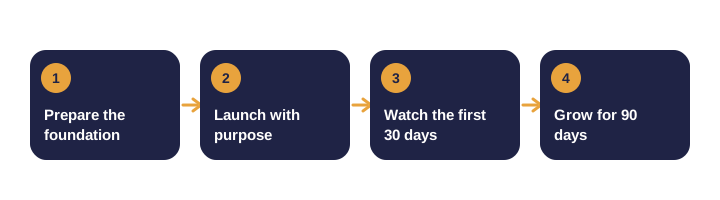
This checklist covers three phases: before launch, launch day and the months after.
Before launch: the technical foundation
- Check every page's basics. Unique title, clear description, one main heading and working internal links.
- Set up analytics. Install tracking and define your conversions, such as forms, bookings and purchases. Test that they fire.
- Connect search tools. Verify the domain in Google Search Console and Bing Webmaster Tools, then submit your sitemap.
- Plan redirects. Map every old URL that has traffic or links to its closest new page.
- Test speed and mobile. Check key pages on a phone and a slow connection. Compress images.
- Add structured data. Organization, article and FAQ markup help search and AI tools.
- Set canonical URLs. Pick one preferred address for each page and block staging sites from indexing.
- Confirm HTTPS on every page, with no mixed-content warnings.
Before launch: content and conversions
- Write specific copy. Say what you do, who you serve, where you operate and how to get in touch.
- One call to action per page. Make the next step obvious.
- Test every form and email. Confirm messages arrive and that you can respond quickly.
- Prepare a few strong articles. They give visitors and search engines reasons to return.
- Prepare a social preview image and a one-paragraph summary for emails and directories.
On launch day
| Channel | What to do |
|---|---|
| Email list | One clear reason to visit, such as a free resource |
| Social media | Link to a useful page, not only the homepage |
| Partners and customers | Ask them to share if it is relevant to them |
| Business profiles | Update Google Business Profile, LinkedIn and directories |
| Live site | Check forms, contact details and analytics on several devices |
After launch: the first 30 days
- Watch indexing weekly. Fix crawl errors and redirect problems as they appear.
- Review search queries. Find the questions people already use to reach you.
- Track conversions. Know which page leads to a call, sign-up or sale.
- Read the behavior. Look for pages with very short visits or high exits.
- Fix small things. Broken links, typos and slow images are cheap to fix and affect trust.
After launch: the next 90 days
- Publish the first content cluster.
- Earn a few relevant links through partners and directories.
- Set a monthly report covering traffic, priority rankings, conversions and technical issues.
- Test two improvements at a time, not ten.
Common launch mistakes
| Mistake | Why it hurts | How to prevent it |
|---|---|---|
| No analytics before launch | You cannot show what changed | Test tags and conversions on staging |
| Staging pages indexed | Duplicate content | Block staging with robots rules and a password |
| Missing redirects | Lost traffic and broken links | Map every old URL with traffic or links |
| Everything sent to the homepage | Visitors cannot find their answer | Link to the relevant service or article |
| Forms that fail silently | Lost leads | Test each form and confirm the alert arrives |
How do you know the launch worked?
Look for specific signs rather than a feeling:
- Pages are indexed and the sitemap shows no major errors.
- Analytics records visits from every channel you promoted.
- Forms and calls to action produce the conversions you defined.
- Visitors reach key pages without dead ends.
If a sign is missing, you have a specific problem to fix.
How do you replace an older site safely?
- Export every indexed URL, the top-traffic pages and the most-linked pages.
- Build a redirect map to the closest new page, not the homepage.
- After switching, check for redirect chains and loops.
- Watch the coverage report for errors.
- Keep the old analytics property for comparison.
Launch timeline at a glance
| When | Task |
|---|---|
| Two weeks before | Finish content, set up analytics, test forms |
| One week before | Prepare redirects, sitemap and search tool verification |
| Launch day | Publish, announce, check every page on mobile and desktop |
| Week one | Watch indexing and fix errors quickly |
| Day 30 | Review conversions and the top landing pages |
| Day 90 | Report results and choose the next two improvements |
Quick tests you can run in ten minutes
- Open the homepage on your phone and tap every main link.
- Submit each form with test details and confirm the alert arrives.
- Search for your brand name and check that the right page appears.
- Open a service page and confirm the title and description make sense in search results.
- Check that the old homepage address redirects correctly.
Launch terms explained
| Term | Meaning |
|---|---|
| Redirect (301) | A permanent forward from an old address to a new one |
| Canonical URL | The preferred version of a page when duplicates exist |
| Sitemap | A file that lists the pages you want search engines to find |
Scenario: an ecommerce brand replacing its old site
- The team exports the top 300 URLs by traffic and links before the switch.
- Each old product page is redirected to its closest new equivalent.
- After launch, the team checks for redirect loops and 404 errors each day for a week.
- Organic traffic recovers within a few weeks because the important pages kept their paths.
Myths and facts
| Myth | Fact |
|---|---|
| A launch is a single event | It is a process that continues for at least 90 days |
| Design matters more than search setup | Search and measurement decide whether people find the site |
| Staging sites are harmless | Indexed staging pages can create duplicate content |
| Redirects are optional | Missing redirects cause avoidable traffic loss |
| Analytics can be added later | Without a baseline you cannot prove what changed |
Summary checklist
- Answer the main question early and clearly.
- Back up every claim with evidence or a named source.
- Measure progress against your own baseline.
- Review and update the work on a regular schedule.
Need help with a launch?
Our web launch and growth service covers strategy, content, technical setup and the first months of promotion. Get in touch and we will review your plan before go-live.
After launch, see our guides on how long SEO takes and marketing automation.
Frequently asked questions
How soon should I submit my sitemap?
Submit it as soon as the site is live, and check indexing status in Search Console over the following weeks.
Should I launch with a blog?
A few strong articles at launch are helpful, because they give visitors and search engines more to find. Quality matters more than volume.
What should I measure in the first 90 days?
Indexing, impressions for target queries, leads or sign-ups, and the pages that bring the most valuable visits.